![# Junior if page > 3: if len(book[page]["content"]) > 10: print(book[page]["content"]) # Senior if page > 3 and len(book[page]["content"]) > 10: print(book[page]["content"])](https://thewayofpython.com/wp-content/uploads/2023/05/nested-if4.png)
One step further on the way of Python: don’t hide “and” with “if” nesting.
It’s very common to see nested “if” statements in code bases. And if the possibility to nest “if” statement make sense and can be very useful, there is a common anti-pattern easy to recognize and easy to fix. I call this anti-pattern the “hidden and” as it consist of hiding a logical “and” operator with a “if” nested inside another “if”.
Let’s see an example of the pattern and how to fix it:
![# Junior
if page > 3:
  	if len(book[page]["content"]) > 10:
		print(book[page]["content"])
# Senior
if page > 3 and len(book[page]["content"]) > 10:
print(book[page]["content"])](https://i0.wp.com/thewayofpython.com/wp-content/uploads/2023/05/nested-if1.png?resize=967%2C387&ssl=1)
The anti-pattern
This pattern is very common, so it’s important to be able to spot it quickly in code-review for example, to reduce the readability loss from the start.
Flowchart of the anti-pattern
To understand the issue with this anti-pattern, I want you to take a look at the flowchart of the anti-pattern:
if page > 3:
if len(book[page]["content"]) > 10:
print(book[page]["content"])

You can see that the first condition “no” and the second condition “no” point to the same merge point. In this case, this means that both conditions are de facto two part of a bigger one, the condition “first condition and second condition”.
Flowchart of the “fix”
Now, let’s take a look at the flowchart of the following fix:
if page > 3 and len(book[page]["content"]) > 10:
print(book[page]["content"])
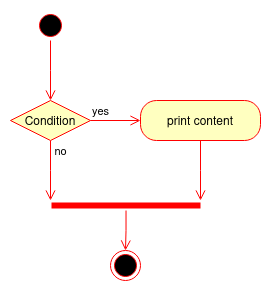
Here, we don’t hide the “and” with a nested “if” statement and make the logical flow of the code more straightforward.
Don’t be zealous
If you think you recognized this pattern in a code base and want to explicitly show the “and” operator instead of using a nested if, you need to be careful and make sure you are in front of a “nested and”.
Have the look but isn’t a “nested and”
Sometimes, a nested if is what it is: a logic branch to do something in addition to the common path, where is logic merge after. Consider the following code:
if page > 3:
  	if len(book[page]["content"]) > 10:
		print(book[page]["content"])
   	print("Next")
You may have noticed and understood the difference. What’s after the nested if is what changes everything, because it’s a “common” part that needs to run without consideration to the nested if. We can see this flow merge in the following flowchart.
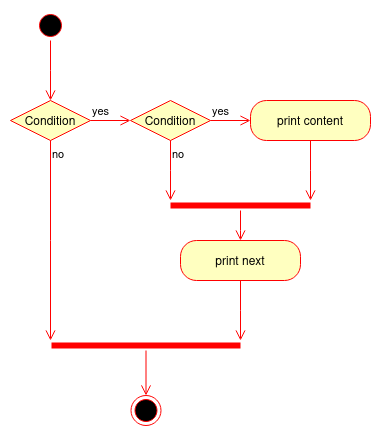
In this case, we are not in a hidden and operator case, because the first condition is part of the logic in itself.
Future merge not yet implemented
Sometimes, the anti-pattern appears but for a reason: the merge code isn’t yet implemented. If you are in a draft pull-request, for example, don’t fix it! Instead, ask the writer about the future merge and if there is any, suggest the addition of an ellipsis (“…”) to make the code more informative about the place of the future implementation:
if page > 3:
  	if len(book[page]["content"]) > 10:
		print(book[page]["content"])
    ...  # a comment who shortly explain what's missing
Leave a Reply